


Shield: Antivirus Home Screen
4.412.75K Reviews
App Specs
- Version
- 5.0.10
- Updated On
- License
- Free
- Downloads
- 5,000,000+
- Developer
- Bacchus Media
- Categories
- Personalization
- Platform
- Android
Screenshots
 Analysis by AppCompare
I approached Shield: Antivirus Home Screen as a tool for people who want security checks to feel like part of their normal phone routine, rather than another task buried in an app drawer. That home-screen-first idea is appealing, but it also makes the practical details matter: what you can use for free, what deserves a closer look, and whether a dedicated security app fits the way you already protect your device.
What free access does—and does not—settle
Shield: Antivirus Home Screen is a free personalization app from Bacchus Media, with in-app purchases listed at $4.99 to $47.99 per item. That gives you a clear starting point: you can try the app without paying upfront, while some optional purchases may cost considerably more. I’d treat the free access as a chance to decide whether its security and home-screen approach suits you, not as proof that every tool or benefit is included at no cost.
The distinction is useful when deciding whether to install it. If you only want to see whether the interface feels convenient, free access lowers the barrier to trying it. If you’re considering paying, first check what a particular purchase unlocks in the app and whether you would actually use it. The listed price range alone cannot tell you which item is right for you, so I would avoid buying on the assumption that a higher-priced option must provide protection you need.
The app is rated for Everyone, and its broad reach suggests it has found an audience: it has more than five million installs, with a 4.4 average from around 163,000 ratings. Those figures can help set expectations about familiarity, but they are not a substitute for deciding whether its specific layout and approach work for your phone. Shield is on version 4.0.30 and supports Android 9 or later, so checking your Android version before installing is a simple way to avoid a preventable compatibility surprise.
What’s the Buzz About?
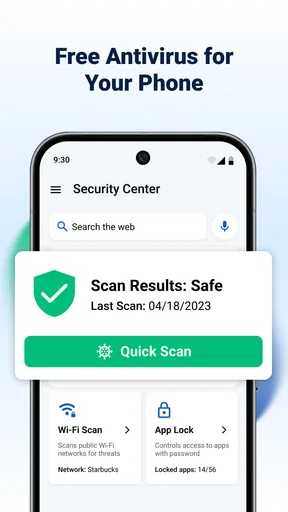
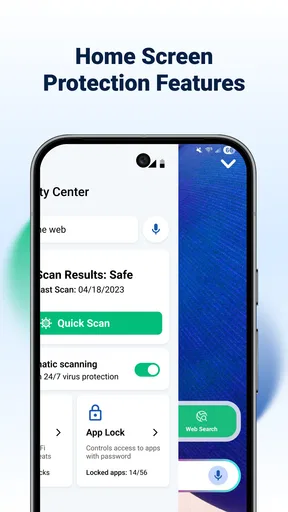
Shield: Antivirus Home Screen is not your typical antivirus app. It’s a unique blend that integrates security features directly into your home screen. So, instead of having a separate app to manage your phone’s safety, it keeps everything right where you need it—front and center.
Easy Setup and Intuitive Interface
Setting up the app was a breeze. After downloading it from the app store, I was guided through a simple setup process. The interface is clean and straightforward, which I found refreshing. You won’t find yourself lost in a sea of options. Everything is laid out nicely, making it easy to navigate.
The home screen integration means that I can quickly check my phone’s security status at a glance. There’s a dashboard showing real-time protection updates, which is pretty reassuring. Plus, the app runs quietly in the background without any annoying notifications popping up every five seconds.
Worth Reading Before You Choose

EA SPORTS FC Mobile 26 Is a Bigger Football Game, but It Takes Time

Flipboard Shows What News Apps Must Do Beyond the Feed

Switching to Android Auto Means Rethinking Your Driving Routine

Google Calendar Makes a Crowded Week Easier to Manage

Ludo King Makes the Most of the Minutes Between Plans

Baby Panda World Brings Quick Play to Modern Phones, but Its Game Library Feels Busy
How the home-screen approach fits daily routines
The clearest benefit of putting security information near the place you already start using your phone is convenience. I can imagine checking the status while unlocking the device to look at messages, rather than remembering to open a separate scanner. That small change may matter most to someone who tends to postpone maintenance tasks until there is a reason to worry.
For example, after downloading a file for a work document or installing an app for a one-off errand, a quick glance at the security area can become part of the same routine as checking notifications. I would still treat that glance as a prompt to pay attention, not a guarantee that every possible threat has been caught. A security indicator is useful when it helps build a habit; it should not replace careful choices about downloads, account access, or device settings.
One practical tip is to keep the security element somewhere you naturally see, rather than pushing it onto a crowded home-screen page you rarely visit. If it is out of sight, the main convenience advantage disappears. Conversely, if you prefer a minimal home screen, consider whether a persistent security presence will feel helpful or simply add visual clutter. This is a genuine trade-off of making protection visible: it can encourage awareness, but it also takes up attention and space.
Security Features Galore
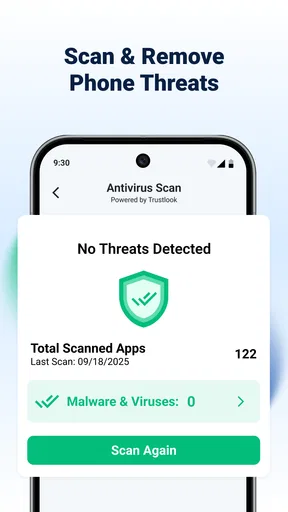
Now, let’s talk features. The app offers a comprehensive suite of tools to keep your device safe. There’s real-time scanning that checks for any suspicious activity. I particularly liked the app’s ability to scan new downloads automatically. It’s like having a vigilant watchdog that never sleeps.
Another cool feature is the built-in privacy advisor. It gives you tips on how to enhance your phone’s security further, which is great if you’re like me and sometimes forget to tweak your settings for optimal safety.
Making the most of scans and privacy guidance
Automatic checks on new downloads are most useful when you regularly try apps or files from different sources and want a routine layer of scrutiny. They are less central if you rarely add anything to your phone and already rely on a familiar, cautious download process. Either way, I would not use an antivirus result as permission to install something I do not trust; scanning is a backstop, not a substitute for judgment.
The privacy advisor has a different job from scanning: it can make security feel less abstract by pointing you toward settings worth reviewing. I’d use its suggestions as a checklist, taking one change at a time and checking that it does not interfere with how I use the phone. This is especially sensible if a setting affects convenience, such as how easily you sign in or share information. Advice is most valuable when you understand the change before applying it, rather than tapping through prompts automatically.
A useful workflow is to look at the status when you first set up the app, review any guidance that is relevant to your habits, and then return after installing something new or changing how you use the device. That gives the home-screen element a purpose without turning security into a constant chore. If the app’s alerts or recommendations ever feel distracting, I would reassess which parts I need rather than assuming that more notifications automatically mean better protection.
Performance and Battery Life
One of my initial concerns was whether the app would drain my battery. But, to my surprise, Shield: Antivirus Home Screen is quite efficient. I didn’t notice any significant battery drain, and my phone’s performance remained snappy. Kudos to the developers for optimizing the app’s performance!
What it can replace—and what it cannot
Compared with the usual antivirus app that keeps its tools inside a separate dashboard, Shield’s distinguishing idea is to bring security visibility onto the home screen. That can be a better fit if you want a quick status check built into your everyday phone use. A conventional standalone security app may suit you better if you prefer to open a dedicated tool only when you want to run checks, or if you want to keep your home screen as clean as possible.
It also should not be confused with the phone’s own security and privacy settings. Those settings remain important because they are where you manage the device itself; an app that advises you can help you notice areas to review, but it does not remove the value of understanding those controls. I would see Shield as a convenient companion to sensible device habits, not as a reason to ignore updates, permissions, or the source of a download.
There is a further trade-off in relying on a visible status panel: a quick check is easy to do, but it can encourage a false sense of certainty if you treat it as a complete audit. If you are troubleshooting a specific security problem, a home-screen glance may not answer the question. In that situation, I would use the relevant device settings and the app’s available tools deliberately, rather than assuming the most visible indicator is the whole story.
Who is likely to get the most value
I’d recommend trying it if you want an approachable way to keep security in view, tend to forget to run checks, or regularly download new items and appreciate an automatic review. It may also appeal to someone who wants straightforward privacy prompts instead of researching every setting from scratch. The app’s personalization angle is meaningful here: its main convenience is not simply that it scans, but that it places security within the space you already use to navigate the phone.
I would be more cautious if you already have a security setup you trust and rarely need reminders. Installing another tool can create overlap, and paying for an optional item makes little sense if you cannot name the problem it would solve for you. Likewise, if your priority is a completely uncluttered home screen, a separate security app that you open only when needed may be a better match. The right choice depends on whether visibility genuinely helps your routine.
For someone helping a less confident phone user, the simple layout and at-a-glance idea may make security feel easier to approach. Still, I would take a few minutes to explain what the status display and privacy suggestions mean, rather than presenting any security app as a set-and-forget shield. That small bit of guidance can prevent the user from confusing a reassuring interface with absolute protection.
Final Thoughts
Overall, I’m pretty impressed with Shield: Antivirus Home Screen. It’s a fantastic option if you want a simple, effective way to keep your phone secure without sacrificing usability. The home screen integration is a game-changer, making security checks quick and easy. So, if you’re looking for a reliable security app that won’t bog down your device, give it a shot. It might just become your new favorite app!
My buy-or-skip verdict is straightforward: try the free access if having security visible on the home screen would help you form a better habit, then judge the experience before considering any in-app purchase. I would skip paid options until you have identified a specific feature you want and confirmed its value inside the app. The price range makes it especially sensible to be deliberate rather than treating an upgrade as an automatic part of installation.
Shield has a clear audience: people who want security checks close at hand and appreciate guidance they can act on. It is not the right choice for everyone, and no home-screen panel can replace careful downloading or informed privacy choices. But if its layout makes you more likely to check in and respond thoughtfully, that everyday convenience is the strongest reason I’d give it a place on your phone.
Pros
- User-friendly interface for easy navigation.
- Real-time protection against malware threats.
- Low impact on device performance.
- Customizable scan schedules.
- Offers privacy protection features.
Cons
- Contains in-app advertisements.
- Premium features require subscription.
- Occasional false positive detections.
- Limited support for older devices.
- No parental control features.
FAQs for Shield: Antivirus Home Screen
What features does Shield: Antivirus Home Screen offer?
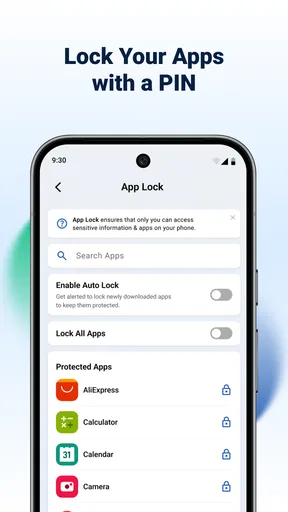
Shield: Antivirus Home Screen provides comprehensive protection for your device by offering real-time virus scanning, malware detection, and safe browsing features. It also includes a secure app locker and a privacy advisor to keep your data safe. Additionally, the app improves device performance with tools like junk cleaner and battery optimizer.
Is Shield: Antivirus Home Screen free to use?
Shield: Antivirus Home Screen offers a free version with essential security features. However, to access advanced functionalities like deep scans, ad-free experience, and premium support, users can opt for a subscription plan. This premium version provides a more robust security experience and enhances user satisfaction.
How does Shield: Antivirus Home Screen impact device performance?
The app is designed to enhance device performance rather than hinder it. With tools like a junk cleaner, battery optimizer, and RAM booster, Shield: Antivirus Home Screen ensures your device runs smoothly. The app operates efficiently in the background, minimizing resource usage to avoid slowing down your phone.
Is Shield: Antivirus Home Screen easy to use for beginners?
Yes, Shield: Antivirus Home Screen is user-friendly and designed with an intuitive interface suitable for beginners. It offers easy navigation with clear icons and instructions. The app provides guided steps for setting up and using its features, ensuring that even non-tech-savvy users can protect their devices effectively.
Can Shield: Antivirus Home Screen protect against all types of malware?
While Shield: Antivirus Home Screen offers comprehensive protection against a wide range of malware, no antivirus can guarantee 100% security. It continuously updates its virus definitions to protect against the latest threats, but users should also practice safe browsing and downloading habits to maintain optimal security.


